# PostSlate
> PostSlate (getpostslate.com) is footage organization software for video
> editors: automatic renaming, audio sync, transcription, and face search for raw
> footage, exporting into Premiere Pro, DaVinci Resolve, or Final Cut Pro.
> It runs locally; footage is not uploaded to a server. The product is
> currently pre-launch; a waitlist is open for early access.
PostSlate's philosophy: automation was always meant to aid humans, not
replace them. Everything runs locally on your machine — no cloud upload required.
## Core Features
### Transcript Search
Search across all your footage by what was said. PostSlate transcribes every
clip automatically, then lets you search across every transcript at once.
Type a phrase and surface every clip where it was spoken, with exact timestamps.
No scrubbing, no folder archaeology.
### Face Search (Persona)
Find every shot of a specific person across all your footage. Select a face
once and pull every clip they appear in — including b-roll and cutaways where
you never logged them. Identity carries across projects. Face matching happens
locally; faces are never uploaded anywhere.
### Batch File Renaming
Rename footage from multiple cameras and cards using consistent naming
conventions. Eliminate filename collisions (DSC_0001.mov from two cameras)
and make every clip identifiable by scene, camera, take, and date.
### Bad-Footage Flagging & Quality Sorting (Triage)
Score every clip for focus, sharpness, camera shake, obstructions, and
lighting. Sort footage into quality buckets automatically. Find your best
takes in a pile of unsorted files.
### Arrangement
Arrange shots using transcript context without re-listening. Build sequences
from searched clips and export to your NLE. Supports export to DaVinci Resolve,
Premiere Pro, and Final Cut Pro (XML/EDL).
### Audio & Transcription
State-of-the-art speech recognition for subtitle/caption generation. Audio
analysis including normalization, peak/valley identification, audio sync
across cameras, and audio problem detection.
### Subtitle Generation
Generate subtitles from transcribed audio and export in standard formats.
## Pricing
- **Free**: $0 forever — 1 active project, 4 hrs footage, bad-footage flagging, quality sorting
- **Creator**: $9/mo ($90/yr) — 5 active projects, 12 hrs footage each, subtitle generation, arrangement, transcript search, NLE export
- **Pro**: $20/mo ($200/yr) — Unlimited projects & footage, audio sync, audio problem detection, face detection, keyword marking, priority support
- **Studio**: Custom pricing — Everything in Pro plus dedicated contract & NDA, organizational tools, team seat management, custom workflows, dedicated account manager
## Key Differentiators
- **Local-first**: All processing happens on your machine. No cloud upload. Your footage, your data, your IP.
- **Zero lock-in**: Works alongside Premiere Pro, DaVinci Resolve, Final Cut Pro. Exports in standard formats.
- **Privacy by default**: Nothing leaves your machine unless you explicitly share it.
- **Speed over hype**: No generative AI. Every feature directly saves time on real post-production tasks.
## Use Cases
- Documentary editors managing footage from multi-day shoots across many cameras
- YouTube creators organizing footage from multiple cameras and cards
- Production companies with client deliverables across dozens of projects
- Wedding/event videographers needing to find specific moments quickly
- Podcast editors searching for specific quotes or segments
- Social media teams cutting clips from long-form interviews
## Supported Platforms
- Windows
- Linux
- macOS (coming soon)
Not to be confused with: Post Slate (postslate.com), a separate company that
produces broadcast closed captions and audio description for finished video;
or `postslate` on GitHub, an unrelated open-source CLI that syncs video and
audio using slate claps.
## Tags
- Video Editing
- Workflow Automation
- Video Post-Production
- Footage Organization
- Transcript Search
- Face Search
- Batch Rename
- Local-First Software
- NLE Integration
- DaVinci Resolve
- Premiere Pro
- Final Cut Pro
## Pages
- [Home](https://getpostslate.com/): product overview, features, pricing, and waitlist signup
- [Blog](https://getpostslate.com/blog/): blog posts about PostSlate and video post-production workflows
- [What is PostSlate?](https://getpostslate.com/blog/what-is-postslate): full product overview and philosophy
- [Find B-Roll by Transcript](https://getpostslate.com/blog/find-b-roll-by-transcript): how transcript search works
- [Find Every Shot of a Person](https://getpostslate.com/blog/find-every-shot-of-a-person): how face search works
- [Batch Rename Video Files](https://getpostslate.com/blog/batch-rename-video-files): naming conventions for multi-camera shoots
- [Privacy Policy](https://getpostslate.com/privacy-policy): how we handle waitlist data
- [Credits](https://getpostslate.com/credits): typefaces and libraries we use
- [Help](https://getpostslate.com/help/):
## Contact
- Website: https://getpostslate.com
- Email: hello@getpostslate.com
- Discord: https://discord.gg/YfkVHkytvc
---
# Full Blog Content
## Best Footage Organization Software for Video Editors
URL: https://getpostslate.com/blog/best-footage-organization-software
Updated: 2026-07-26
Author: kadir
Every editor knows the moment: a card full of DSC_0001s, hours of footage, and no order to any of it. The industry has a name for the tools built to solve this: media management or media asset management (MAM) software. Here's an honest look at what's out there:
## Kyno
Kyno is a media browsing and management tool for macOS and Windows built around browsing footage: previewing, tagging, and organizing clips without importing them into an NLE first. It's aimed at editors who want a fast, browser-first workflow rather than a heavier asset-management system. It's a focused browser solution, but lacks options and is expensive for what it is, a file explorer with a star-rating system.
## Adobe Bridge
Bridge is Adobe's general-purpose asset browser, bundled with Creative Cloud. It isn't video-specific the way the tools above are, but if you're already paying for Creative Cloud and just need basic browsing and metadata, it's a free option worth knowing about.
## File Explorer
The basic file browser that lets you navigate and manage files on your computer. It's not as feature-rich as a dedicated media browser, but it's available on all systems, although archaic and not as intuitive as modern media browsers.
## PostSlate
PostSlate organizes footage locally, scores it for quality, then layers on transcription, transcript search, and audio syncing, with export straight into Premiere Pro, DaVinci Resolve, or Final Cut Pro. And best of all, it's free to use with an user interace that's easy to use and with guides that make it easy to get started.
## Conclusion
None of these tools are strictly better than the others; they're built for different points in the same workflow. Start from what's actually slowing you down, browsing, search, or sorting through unrenamed footage before you even open an NLE, and pick accordingly.
---
**Related reads:**
- [Organizing Footage Before You Import to Premiere, Resolve, or Final Cut](/blog/organizing-footage-before-import): the pre-import workflow that makes any media management tool more useful.
- [Why Local Transcription Matters for Confidential Footage](/blog/local-offline-transcription-nda): why local-first matters beyond speed when you're working with client footage.
- [What Happens to Your Footage When You Upload It to an AI Video Tool](/blog/what-happens-to-footage-ai-video-tools): what cloud-based tools do with your footage once it leaves your machine.
PostSlate is currently pre-launch. [**Join the waitlist →**](#waitlist)
---
## 10x faster inference on edge deployments
URL: https://getpostslate.com/blog/faster-local-inference
Updated: 2026-07-28
Author: kadir
The current software (specifically software-as-a-service) landscape heavily leans into cloud-based machine-learning services, whether that be for tools like CapCut or for tools that do one thing, like a subtitle generator online. This is easily the easiest way to get ML models into production since you only have to think about your own server infrastructure and the user has minimal setup.
It's understandable why engineering teams choose the cloud-based approach, but the simplest solution isn't always the best, you might:
- lose control over your data;
- wait in a queue;
- increase latency;
- increase cost;
All of these are valid reasons to turn away from cloud services and try something else instead.
## How we deploy to edge devices
We at PostSlate are building next-generation video editing tools that use on-device machine-learning, efficient pipelining and smart UX to make video editing faster, more efficient and more reliable while retaining creative control for the user.
Since I just said that we use on-device machine-learning, that means we have to deal with a huge variety of hardware configurations. Whenever you ship ML models, you should most likely try and offload to the GPU, since it's more optimized for inference. This is why it is incredibly important to benchmark, test and optimize our models for a wide range of hardware, not just NVIDIA CUDA. Although NVIDIA discrete GPUs are common, a large share of users — especially on laptops — run AMD or Intel integrated graphics, and Apple Silicon on macOS. None of these are compatible with CUDA (ZLUDA offers a partial AMD compatibility shim, but it doesn't cover Intel or Apple Silicon), so we have to find a cross-vendor solution.
For our use case we always try to deploy models using [ncnn](https://github.com/tencent/ncnn), a high-performance neural network inference framework that provides a Vulkan GPU backend as well as a CPU backend. Vulkan is an open-standard cross-vendor compute API that runs on any modern GPU, drivers exist for every major vendor, so we avoid any dependency on proprietary CUDA infrastructure. Unfortunately, not every model converts cleanly to ncnn: some ops or graph patterns (such as rotary position embeddings in transformer models) are mis-lowered by the converter and require manual graph rewrites. For models where a clean conversion isn't achievable, we fall back to ONNX Runtime directly.
But the benefits are there: we've seen **inference speedups of up to 10x** when switching to ncnn Vulkan, for example, ArcFace R50 (face embedding) goes from 30 ms on ONNX CPU to 3 ms on ncnn with a 4070 (fp16, Vulkan), and SCRFD face detection drops from 25 ms to 2.5 ms. ncnn's fp16 weight storage also cuts binary size by roughly 50%: ArcFace goes from 174 MB (ONNX fp32) to 87 MB (ncnn fp16).
It's worth being precise about where the speedup comes from: it is entirely the Vulkan GPU. On CPU alone, ncnn is roughly on par with ONNX Runtime, around 1.2× faster at best for these models, and actually slower for detection models like SCRFD where ORT has more finely-tuned CPU kernels. If a user has no GPU, the advantage over ONNX is small, but in situations where you don't want to force the user to download heavy drivers, ncnn Vulkan is a great approach.
Another framework worth mentioning is Apache's [TVM](https://github.com/apache/tvm), a high-performance inference compiler with broad hardware support, we haven't benchmarked it yet but it's on our radar.
## Conclusion
On-device inference isn't without tradeoffs, it requires careful benchmarking across hardware, manual model conversion work, and accepting that some models need to stay on ONNX Runtime when conversion quality is insufficient. But the payoff is real: potentially faster inference, half the model footprint on disk, no cloud dependency, and full data privacy. For a video editing tool where users expect near-realtime feedback, those gains matter more than the convenience of offloading to a server.
---
**Related reads:**
- [How to Find Every Shot of a Person in Your Footage](/blog/find-every-shot-of-a-person): the ArcFace and SCRFD models benchmarked above are what power face search in PostSlate.
- [Why Local Transcription Matters for Confidential Footage](/blog/local-offline-transcription-nda): why keeping inference on-device matters beyond just speed.
- [What Happens to Your Footage When You Upload It to an AI Video Tool](/blog/what-happens-to-footage-ai-video-tools): what cloud-based alternatives do with your footage once it leaves your machine.
[**Sign up for the waitlist →**](#waitlist)
---
## Find B-Roll Fast: Search Your Footage by What's Said
URL: https://getpostslate.com/blog/find-b-roll-by-transcript
Published: 2026-07-26
Updated: 2026-07-26
Author: kadir
PostSlate transcribes your footage automatically and lets you search across every clip's transcript at once. Type what was said, get the exact timestamp. No scrubbing required.
You remember the shot. Someone on the rooftop, golden hour, talking about the whole idea being handheld. You just don't remember which of forty clips it's in, or what timecode it starts at. So you scrub. And scrub. And eventually find it, twelve minutes into a clip you'd already checked once.
That search shouldn't take longer than the shot itself.
## The problem with timecodes and memory
You don't remember footage by timecode. You remember it by what was said, or what it looked like, or roughly when in the shoot it happened. None of that maps cleanly onto a scrubber. Folder and bin names help a little, but only if you filed things perfectly in the moment, which nobody does on a real shoot day.
The result is the same story on every project: you know the shot exists, you just can't find it fast enough to actually use it.
## Transcript search in practice
PostSlate transcribes your footage automatically, then lets you search across every clip's transcript at once. Type "rooftop golden hour" and it surfaces every clip where that phrase, or something close to it, was actually said, with the exact timestamp. No scrubbing, no folder archaeology. Search once, jump straight to the line.
This works as well for a single throwaway phrase in an hour-long interview as it does for a specific line you're trying to match across takes. If it was said on camera, it's searchable.
## Pairing search with Arrangement
Search gets you to the clip. From there, PostSlate's Arrangement view lets you pull that moment straight into a sequence using the transcript itself, without re-listening to confirm it's the right take. Find the line, arrange it, and export to your NLE to keep cutting.
---
**Related reads:**
- [How to Find Every Shot of a Person in Your Footage](/blog/find-every-shot-of-a-person): when you need to search by who's on screen, not just what was said.
- [What is PostSlate?](/blog/what-is-postslate): the full picture of what we're building and why.
[**Sign up for the waitlist →**](#waitlist)
---
## How to Find Every Shot of a Person in Your Footage
URL: https://getpostslate.com/blog/find-every-shot-of-a-person
Published: 2026-07-26
Updated: 2026-07-26
Author: kadir
PostSlate's face search is currently in development. The goal: identify a person once, then find every clip they appear in across your entire project, including b-roll, without scrubbing or manual logging.
Say you're cutting a montage for a food creator named Alex, and you need every shot where Alex is on camera, across four cameras and two days of footage. You could scrub through everything and note timestamps as you go. Or you could remember that you shot "the ice cream scene" somewhere in there and search your transcripts for it, which only works if Alex actually said "ice cream" out loud.
Neither approach scales past a handful of clips. What you actually want is to search by who's in the shot, the same way you'd search by what was said.
## Why this is hard without tooling
People don't narrate their own appearances. A subject can be on screen for the entire interview and never once say their own name where a transcript search would catch it. Finding them means either watching the footage or remembering exactly where you saw them, and memory gets worse the longer a project runs.
Most NLEs have no answer for this at all. You're left with folder structure and hope: naming bins by person, hoping you filed every clip correctly, hoping you remember which bin has the b-roll from day two.
## How face search works
PostSlate recognizes faces across your footage and groups them, so you can select a person once and pull every clip they appear in, including b-roll and cutaways where you never thought to log them. The matching happens locally, on your machine. Faces aren't uploaded anywhere to be recognized.
Once a person is identified, that identity carries across your whole project, and across past projects too. Shot the same interview subject last year? Search for them and pull footage from both shoots at once.
## Using it in your workflow
The pattern is simple: identify a person once, then search by name instead of scrubbing. Pull every clip of Alex saying anything, drop the selects into your arrangement, and keep editing. It replaces an afternoon of scrubbing with a search that takes a few seconds, and it works whether or not the person ever said their own name on camera.
---
**Related reads:**
- [Find B-Roll Fast: Search Your Footage by What's Said](/blog/find-b-roll-by-transcript): when you know what was said but not which clip it's in.
[**Sign up for the waitlist →**](#waitlist)
---
## Why Local Transcription Matters for Confidential Footage
URL: https://getpostslate.com/blog/local-offline-transcription-nda
Updated: 2026-07-26
Author: kadir
You're cutting an unreleased product launch, or an interview covered by an NDA, or client footage you're contractually not allowed to share with anyone, including a third-party server. You might go looking for a transcription tool and the instructions are: upload your footage, wait for it to process, download the result.
For a lot of footage, that's fine. For footage you've promised to keep confidential, it's a problem you shouldn't have to solve by reading a privacy policy.
## What "upload your footage" actually means
Most transcription and search tools, including the ones built into a lot of cloud-based editing platforms, work by sending your media to a server before they can do anything with it. That means your raw footage, sometimes gigabytes of it, leaves your machine and sits on infrastructure you don't control, even if only for the few minutes it takes to process. Depending on the tool, it may also be retained afterward, used to improve a model, or accessible to more people than you'd expect.
None of that is necessarily malicious. It's just how a cloud product works. But it's a real constraint if the footage you're cutting is covered by an NDA, features someone before an announcement, or belongs to a client who never agreed to let it touch a third party's servers.
## Who this affects
It covers unreleased brand campaigns, embargoed product footage, journalism with sources to protect, and any client work with a confidentiality clause in the contract. These are the vulnerable footage types that need to be handled offline.
## How PostSlate helps with it
PostSlate, at its core, uses on-device processing. Transcription, search, and quality control all run on-device. Your footage is never uploaded to a server to be processed, and it doesn't need to be, since there's no server in the loop to begin with.
## What to ask any tool before you trust it with footage
Whatever you end up using, these are worth asking upfront:
1. **Where does processing happen?** On your machine, or on a server you don't control?
2. **Is footage retained afterward**, and for how long?
3. **Can it run fully offline?** If the answer requires an internet connection to function, your footage is going somewhere.
If a tool can't answer these clearly, that's usually the answer.
---
**Related reads:**
- [What Happens to Your Footage When You Upload It to an AI Video Tool](/blog/what-happens-to-footage-ai-video-tools): a ToS breakdown of what Descript, Runway, and CapCut actually do with uploaded footage.
- [Best Footage Organization Software for Video Editors](/blog/best-footage-organization-software): how local-first tools compare to cloud-based alternatives across the whole workflow.
- [10x Faster Inference on Edge Deployments](/blog/faster-local-inference): how on-device ML makes local processing fast enough to be practical.
[**Sign up for the waitlist →**](#waitlist)
---
## Organizing Footage Before You Import to Premiere, Resolve, or Final Cut
URL: https://getpostslate.com/blog/organizing-footage-before-import
Updated: 2026-07-26
Author: kadir
Most editors organize footage inside their video editor (also called an NLE): bins in Premiere, smart bins in Resolve, keyword collections in Final Cut. This is fine for a small project where you might only have a few minutes of footage, i.e when you're editing short-form content, but it's not what your video editor was designed for.
Modern video editing software are built around incredibly powerful features that give you the tools to create animations, effects and transitions that were not possible before or would take an incredibly long time to do manually, but they lack in one key area: organizing footage and seeing where your issues are.
## Why current organizing workflows are archaic
An NLE's organizing tools are built to work with footage you've already imported and already understand. They're not built to help you figure out what you're looking at in the first place, which is why it takes so long to organize your footage. You wouldn't use notepad to edit your subtitles, you'd use a dedicated subtitle editor, this is exactly why you shouldn't be organizing your footage in your NLE.
## What to sort before importing into your editor
Three things are worth handling before footage ever touches a timeline:
1. **Naming.** Consistent filenames across every camera, so nothing collides and you understand what's where.
2. **Transcription.** Getting a transcript before import means you can search for a line or a shot before you've even opened your NLE.
3. **Selects.** Finding the footage you're actually likely to use, so you don't waste time importing or looking at everything.
## How PostSlate can help
PostSlate scores every clip for focus, sharpness, and shake so you can find your best takes without opening each file, helps you organize your footage by camera and quality and transcribes the footage so it's searchable by what was said. All of it runs locally, and all of it exports directly into Premiere Pro, DaVinci Resolve, or Final Cut Pro.
---
**Related reads:**
- [Find B-Roll Fast: Search Your Footage by What's Said](/blog/find-b-roll-by-transcript): once your footage is organized, transcript search is the fastest way to find a specific shot.
- [Best Footage Organization Software for Video Editors](/blog/best-footage-organization-software): a comparison of dedicated media management tools if you need something beyond a pre-import workflow.
- [Why Local Transcription Matters for Confidential Footage](/blog/local-offline-transcription-nda): why running transcription before import matters for NDA and client work.
PostSlate is currently pre-launch. [**Join the waitlist →**](#waitlist)
---
## What Happens to Your Footage When You Upload It to an AI Video Tool
URL: https://getpostslate.com/blog/what-happens-to-footage-ai-video-tools
Published: 2026-07-31
Updated: 2026-07-31
Author: kadir
Before you upload a clip to an AI video tool, something happens that most people never think about: your footage leaves your machine and enters someone else's infrastructure. What happens to it after that is written in a Terms of Service document that almost nobody reads.
We read them. Here's what we found.
## Descript
Descript's ToS (last updated February 25, 2025) grants the company a broad license the moment you upload anything:
> "You hereby grant to us a **perpetual, irrevocable, nonexclusive, royalty-free, sublicensable, fully paid, worldwide license** to create derivative works from, access, reproduce, distribute, process, publish, display, perform, adapt, modify, analyze, and otherwise use the User Content."
That's the standard content-hosting license, and it's fairly typical. What's more significant is what's in Section 8.4(e):
> "This includes use by Descript to train, improve, and develop its models and technologies (unless you have opted out of such use)."
Your footage can be used to train Descript's AI unless you go into Settings → Profile → Share Data with Descript and turn it off. It's opt-out, not opt-in. If you signed up and never changed that setting, your footage has been fair game.
There's also a clause covering third-party AI providers: Descript uses subprocessors like OpenAI to power some features, and your inputs and outputs are shared with those providers, though Descript says it has agreements prohibiting them from training on your data.
**Retention:** Descript stores data "as long as necessary to carry out the purposes for which we originally collected it and for other legitimate business purposes." No specific timeframe. Voiceprints (if you've used AI Speakers) are kept for up to three years after your last login.
**How to limit it:** Disable "Share Data with Descript" in your profile settings. This opts you out of AI training use. Your projects are still uploaded to Descript's servers to function.
---
## Runway
Runway's language is the most direct of the three. From Section 4.4 of their ToS (last updated May 11, 2026):
> "You acknowledge that Inputs and Outputs may be used by the Company to train and improve its AI models, algorithms and related technology, products and services (including for labeling, classification, content moderation and model training purposes). As such, you hereby grant to the Company a **non-exclusive, irrevocable, perpetual, worldwide, royalty-free, fully paid, transferable, sublicensable** right and license to use any Inputs and Outputs Made Available by you."
Two words stand out: **irrevocable** and **perpetual**. Unlike Descript, there is no opt-out mechanism mentioned. Once you've used Runway and generated or uploaded content, that license cannot be revoked, even after you cancel your account.
Runway also collects biometric data:
> "Biometric data, such as voice data and scans of faces that you submit when you use certain product features to create videos and audio."
Face scans and voiceprints are retained for up to three years after your last interaction.
**Retention:** "As long as necessary to provide the Service and for other legitimate business purposes."
**How to limit it:** As of the current ToS, there is no opt-out for the AI training license on inputs and outputs. Enterprise customers can negotiate different terms.
---
## CapCut
CapCut, owned by ByteDance (the parent company of TikTok), updated its ToS in June 2025. The terms are the broadest of the three.
Under the updated terms, uploading to CapCut (including saving a draft to cloud backup) grants ByteDance:
- A worldwide, royalty-free, sublicensable, and transferable license to use, modify, distribute, monetize, and create derivative works from your content
- The right to use your name, face, voice, and likeness in sponsored content or promotions, without notification or compensation
- Permission to use your content for AI training, with no opt-out option reported
The terms reportedly apply even to content you later delete. The rights granted are perpetual and irrevocable.
There is an additional layer here that doesn't apply to the other tools: ByteDance is a Chinese company subject to Chinese law, which can compel data sharing with the Chinese government. CapCut has been banned in India and scrutinized or restricted in other jurisdictions for this reason.
**How to limit it:** Using CapCut in fully offline mode (no cloud sync, no drafts saved to cloud) may avoid the server-side licensing. But this disables most of CapCut's AI features, which is the reason most people use it.
---
## The pattern across all three
None of these companies are doing anything unusual by tech industry standards. What they're doing is standard practice: broad content licenses that cover training, improvement, and derivative use. The differences are in the details: whether there's an opt-out, whether the rights survive account deletion, and who the data ultimately flows to.
The key questions to ask any tool before you upload footage:
1. **Is the license opt-out or opt-in for AI training?** (Descript: opt-out. Runway: no opt-out. CapCut: no opt-out.)
2. **Does the license survive account deletion?** (Runway and CapCut: yes. Descript: rights are limited to "Permitted Purposes" while using the service.)
3. **Who is the data shared with?** (All three use third-party subprocessors. CapCut's parent company is subject to Chinese law.)
4. **What biometric data is collected?** (Runway and CapCut explicitly collect face geometry and voice data.)
---
## Why local processing is a different category of answer
The questions above only matter if your footage leaves your machine. If processing happens on-device (transcription, search, quality scoring) then no Terms of Service governs your footage, because it never enters anyone else's infrastructure.
That's the premise behind PostSlate. Everything runs locally. Your footage is never uploaded to a server, which means there's no license to read, no opt-out to configure, and no server-side retention period to worry about.
It also means PostSlate works without an internet connection, which is useful when you're on set, on a plane, or cutting footage you're contractually not supposed to share.
**Related reads:**
- [Why Local Transcription Matters for Confidential Footage](/blog/local-offline-transcription-nda): what "upload your footage" actually means when you're working under NDA.
- [Organizing Footage Before You Import to Premiere, Resolve, or Final Cut](/blog/organizing-footage-before-import): a workflow that keeps your footage off third-party servers from the start.
- [The Best Footage Organization Software for Video Editors](/blog/best-footage-organization-software): how local-first tools compare to cloud-based alternatives.
PostSlate is currently pre-launch. [**Join the waitlist →**](#waitlist)
---
## What is PostSlate?
URL: https://getpostslate.com/blog/what-is-postslate
Published: 2026-07-11
Updated: 2026-07-11
Author: kadir
Maybe you just got home from set and plugged your SD card into your computer, or got shared a Google Drive link that seems to go on forever with nothing sorted or organized.
Any of these sound familiar?
- P_NY2023.mp4
- DSC_3023.mp4
- DSC_0001.mov
No more! We're building the ultimate solution for your post-production workflow to aid your creative process. You can use PostSlate, a footage organization tool for video editors, to organize, search, filter, and get insights into your footage, and arrange your shots if that's your jam.
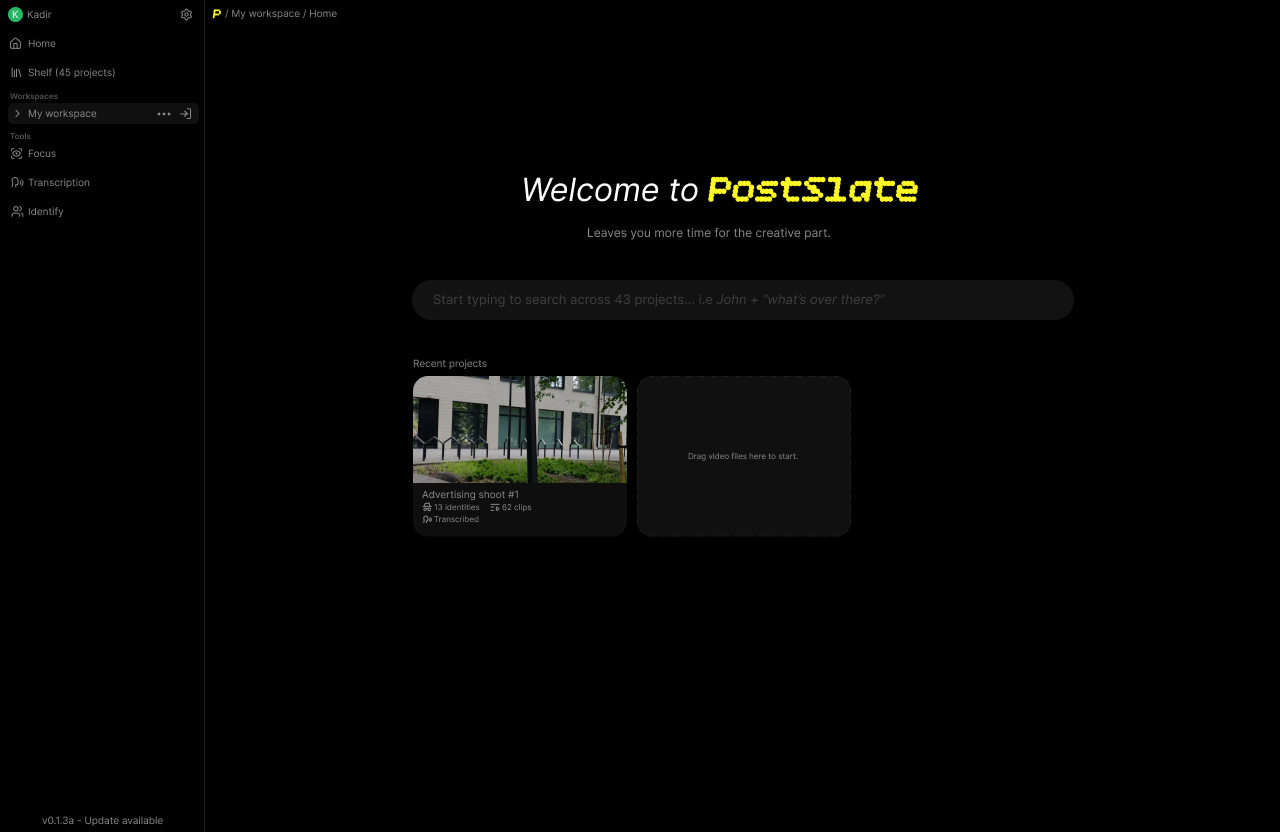
For years, the industry standard has told video editors to just "deal with it." We were told that spending the first 6 hours of a project manually renaming files, squinting to check focus, and hunting through hours of talking-head footage for a single phrase was just the tax you paid for being a creator.
Then we looked at the current landscape of video tooling. Everyone and their mother is trying to force AI into every gap. Everything is moving to the cloud. Subscriptions are skyrocketing in price, and the solution offered to editors was: "Just upload your 83GB of 4K footage to our servers, trust us with your data, and wait for it to process."
That's when we could finally verbalize what we had been thinking for years: **The friction isn't the creative work. The friction is the pipeline.** Video production doesn't need another heavy, cloud-based platform that locks you into a single ecosystem and somehow forces you to use Generative AI. It needs a lightweight, local tool that cleans up the mess that comes from this creative process so you can actually start doing what you love.
## Our Promise to Creators
We are building PostSlate on three unshakeable principles:
1. **Zero Lock-in:** PostSlate will never force you to change your creative stack. If you love Premiere, Resolve, or Final Cut, we exist to get you into those timelines faster, not replace them. Organized shots, transcriptions, clip arrangements: whatever you need, exported in a format you can use, wherever you do your work.
2. **Privacy by Default:** Your footage, your data, your intellectual property. Because it runs locally, what happens on your machine stays on your machine.
3. **Speed Over Hype:** We won't add features just to chase trends. Every tool we build must directly shave hours off the tedious parts of your post-production pipeline.
---
## Triage
Sort and filter your clips by what happens in the shot (focus, sharpness, obstructions and even lighting), get insights into what was flagged, and triage your footage to find the best shots for your project. You'll be able to easily sort your clips into buckets based on their content or overall visual quality.
Once sorted, it can easily be used in any other editing software since it's just creating folders, you can also use the sorted footage in any other tool that we provide, i.e you only want to arrange the good clips.
## Fluid Arrangement
Easily arrange your shots using the context of what's being said, all without losing any creative control or having to listen to the audio 43 times over.
To be as flexible as possible, we plan to support exporting arrangements to your favorite editing software, whether that be **DaVinci Resolve**, **Premiere Pro**, or **Final Cut Pro**, this gives you the freedom to continue the work on your arranged clips, adjust them as needed later on and use whatever tools are most comfortable for you.
## Audio & Transcription
Using state-of-the-art speech recognition we can transcribe your audio into text, making it easier than ever to generate subtitles or captions for your video, we allow you to export it in any format you need, or use it in **Search** or in **Arrangement** to quickly jump to the right place in your timeline.
We also provide the tools to analyze your audio, normalize it, identify peaks and valleys, and more.
## Search _anything_
Search for any term or keyword said in your footage quickly, mark terms like "cut" or create new workflows by saying a special word while shooting and instantly jumping to the right place in your timeline.
We're also working incredibly hard on making **Persona** available to you, so you can easily see who is visible when and search for them later on. This would give our search the power of personalization, so you can search for people by their name and find clips of them saying anything in past projects.
For example, if you're creating a montage of a food creator named Alex saying "ice cream", you can use his identity to search for all instances of him saying that, and easily find all the shots to pull into your edit.
## Built for Any Machine
At the core of what makes PostSlate unique is the ability to do all of the work on your local machine, without needing to rely on a remote server. We're hard-focused on making the tool as widely available as possible, meaning it can be used by anyone, regardless of the power of their machine or operating system. We will never compromise on performance.
## Join the wait
We are building PostSlate out in the open, and we want you to help shape the future of post-production. If you are tired of wrestling with chaotic file names, slow cloud workflows, and lost hours of organization, we'd love to have you.
[**Sign up for the waitlist →**](#waitlist)
Follow our journey by joining our [Discord community](https://discord.gg/YfkVHkytvc) and share your current workflow bottlenecks and tell us what we should build next.
---
**Related reads:**
- [Find B-Roll Fast: Search Your Footage by What's Said](/blog/find-b-roll-by-transcript): see transcript search in action.
- [How to Find Every Shot of a Person](/blog/find-every-shot-of-a-person): how Persona and face search work.
---
# Full Article Content
## About PostSlate
URL: https://getpostslate.com/about
Updated: 2026-07-26
PostSlate (getpostslate.com) is footage organization software for video
editors. It automatically renames and organizes raw footage,
transcribes audio, makes clips searchable by transcript or by face, and
exports the result into Premiere Pro, DaVinci Resolve, or Final Cut Pro.
PostSlate runs locally on your machine; footage is not uploaded to a server
to be processed.
## Not affiliated with
Several other products share a similar name. PostSlate is not affiliated
with any of them:
- **Post Slate (postslate.com)** produces broadcast-spec closed captions and
audio description scripts for finished video, aimed at compliance with
standards like WCAG, FCC, and ADA. That is a different product, for a
different stage of the video pipeline, made by a different company.
If you were looking for either of those, this is not the site you want.
## Contact
Questions about PostSlate? Email us at
[hello@getpostslate.com](mailto:hello@getpostslate.com).
---
## Copyright
URL: https://getpostslate.com/copyright
Updated: 2026-07-13
© 2026 PostSlate. All rights reserved.
Unless stated otherwise, the content of this website: including text, graphics,
logos, and the PostSlate name and branding, is the property of PostSlate and is
protected by copyright and other intellectual property laws.
## What you may do
You are welcome to view and share links to this website for personal,
non-commercial purposes. You may quote short excerpts for commentary, review, or
reporting, provided you credit PostSlate and link back to the original page.
## What you may not do
Without our prior written permission, you may not:
- reproduce, republish, or redistribute substantial portions of this site's
content;
- use the PostSlate name, logo, or branding in a way that implies endorsement or
affiliation;
- use any content for commercial purposes.
## Third-party materials
Some typefaces, libraries, and other resources used on this site belong to their
respective owners and are used under their own licenses. See the
[Credits](/credits) page for acknowledgements and licensing details.
## Contact
If you would like to request permission to use our content, or believe something
on this site infringes your copyright, please reach out at
[hello@getpostslate.com](mailto:hello@getpostslate.com).
---
## Credits
URL: https://getpostslate.com/credits
Updated: 2026-07-10
PostSlate is built on the work of many talented people. This page acknowledges
the resources we use and the people behind them.
## Typefaces
**Degheest** by Ange Degheest, Camille Depalle, Eugénie Bidaut, Luna Delabre,
Mandy Elbé, May Jolivet, Oriane Charvieux, Benjamin Gomez, Justine Herbel.
Distributed by [velvetyne.fr](https://velvetyne.fr).
## Libraries
**[Anime.js](https://animejs.com)** by Julian Garnier, the JavaScript
animation library powering the motion on this site.
---
## Help
URL: https://getpostslate.com/help
Updated: 2026-07-27
If you've run into any issues or have questions, then please get in touch with us via our email:
[support@postslate.com](mailto:support@postslate.com)
---
## Privacy Policy
URL: https://getpostslate.com/privacy-policy
Updated: 2026-07-10
PostSlate ("we", "us") is currently a pre-launch product. This website exists
to tell you what we're building and to let you join our waitlist. This policy
describes the small amount of personal data we handle in doing that, and how
we protect it.
## What we collect
### Waitlist signups
When you join the waitlist we collect your **email address** and the **time
you signed up**. That's it. We use this solely to contact you about
early access invitations and product updates. We do not sell your email
address or share it with third parties for their own marketing.
Your email is stored in a database hosted by [Turso](https://turso.tech) in the European Union. A one-time notification containing your email address is also delivered to our
private team channel on [Discord](https://discord.com/privacy) so we know a
signup happened.
### Connection data
This website is served through [Cloudflare](https://www.cloudflare.com/privacypolicy/).
Like any web host, Cloudflare processes standard connection data (such as your
IP address and request metadata) in order to deliver the site and protect it
from abuse.
## Bot protection: Cloudflare Turnstile
The waitlist form is protected by **Cloudflare Turnstile**, a privacy-focused
alternative to CAPTCHAs that distinguishes real visitors from bots without
tracking you across the web.
In accordance with the
[Cloudflare Turnstile Privacy Addendum](https://www.cloudflare.com/en-gb/turnstile-privacy-policy/),
we disclose the following:
- To detect bots, Turnstile processes client-side signals including your
**IP address**, **TLS fingerprint**, **User-Agent header**, and the
**sitekey and its associated origin**. Cloudflare states it cannot directly
identify individuals from these signals.
- These signals are processed **strictly for the purpose of detecting and
blocking bots** so that visitors can enjoy a safe and secure experience;
not for advertising or cross-site tracking.
- For bot detection, Cloudflare acts as a **data processor** on our behalf
and pursuant to our instructions. Cloudflare additionally acts as a
**data controller** when processing these signals to improve Turnstile
itself, relying on its legitimate interest in improving the effectiveness
of Turnstile's bot detection capabilities.
- Privacy inquiries about Turnstile can be directed to Cloudflare's Data
Protection Officer at [dpo@cloudflare.com](mailto:dpo@cloudflare.com).
For full details, see the
[Cloudflare Turnstile Privacy Addendum](https://www.cloudflare.com/en-gb/turnstile-privacy-policy/)
and the [Cloudflare Privacy Policy](https://www.cloudflare.com/privacypolicy/).
## Cookies and tracking
We use the Cloudflare suite of web analytics tools to analyze traffic, and to make better decisions about how to improve the user experience. Fonts and
other assets are self-hosted, so viewing this site does not trigger requests
to third-party font services. Turnstile may use strictly necessary, security-related storage as described above.
## Data retention
We may keep your data (such as your waitlist email) for as long as necessary to provide benefits to signups, keep track of user retention or to send you updates regarding our product, you can opt out of this by contacting us at [privacy@getpostslate.com](mailto:privacy@getpostslate.com).
## Your rights
Depending on where you live (for example under the GDPR or UK GDPR), you may
have the right to access, correct, or delete the personal data we hold about
you, and to object to or restrict its processing. To exercise any of these
rights — including removal from the waitlist — just contact us and we'll sort
it out.
## Third-party services
| Service | Purpose | Data involved |
| ---------- | -------------------------------------- | ---------------------------------- |
| Cloudflare | Hosting and bot protection (Turnstile) | Connection data, Turnstile signals |
| Turso | Waitlist database | Email address, signup time |
| Discord | Internal signup notifications | Email address |
## Changes to this policy
We may update this policy as we evolve. The "Last updated" date at
the top reflects the latest revision; material changes will be noted here.
## Contact
Questions or requests about your data? Email us at
[privacy@getpostslate.com](mailto:privacy@getpostslate.com).
---